10.22

I get a lot of requests to add ringtones to BoostApps. Unfortunately that's not possible. The Sprint developer tool that I use to send apps and games to user's phones doesn't do ringtones. However I've found a relatively easy way to make very loud, high quality ringtones from any .mp3 music files that you own and send them to your Boost or Nextel iDEN phone. Here's how:
Prerequisites:
- A Boost or Nextel Motorola phone that has Bluetooth such as the i776, i465, i856, i9, i870, i880 or i885
- A PC or laptop that supports Bluetooth. If yours doesn't Bluetooth USB adapters are cheap. Here's one on Amazon for $4.49 including shipping
. These instructions are based on using Windows XP because that's what I have. All of this should be possible on other OSes but you will have to adapt the instructions yourself.
- An MP3, WAV, AIFF, OGG or FLAC music file that you would like to use as a ringtone.
Proceedure:
- Download and install Audacity, a free, open source program for Windows, Mac OX and Linux that lets you manipulate and convert audio files. I recommend the Audacity 1.3 Beta as it's much easier to use than earlier versions.
- Download and install the Lame MP3 Encoder for Audacity
- Follow the excellent Audacity tutorial on making MP3 ringtones for Nextel phones. What follows is a high level summary, refer to the original if you get stuck.
- Open the file you want to use (File > Import > Audio) in the Audacity menu).
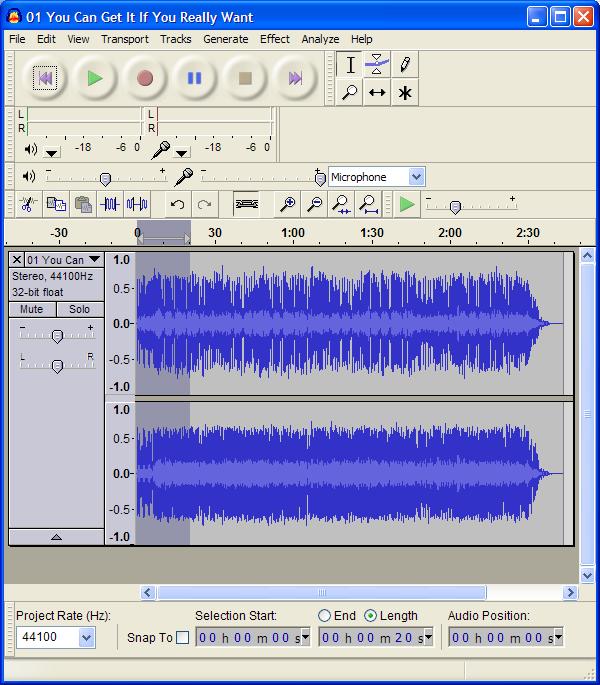
- Select a 20 second section of the song that you'd like to use by clicking in the waveform and dragging the selection area to left or right with the mouse (image, top). Click Edit > Trim in the menu to remove the rest of the file
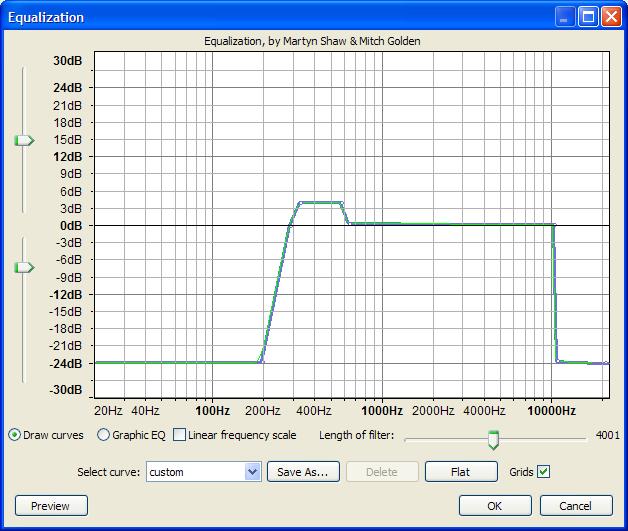
- (Optional but recommended to make the sound less tinny): Click Effect > Equalization and use the mouse to click and drag the frequency line down to -24 db for the frequencies below 300 Hz and above 10,000 Hz. Drag the line up to about 4 db in the range between from 300 Hz and 600 Hz (see image, above).
- (Optional but recommended to make the ringtone louder): Click Effects> Compressor. The default compressor settings are fine for our purposes so just click "OK" without changing anything. Then Click Effect > Amplify and type -3 in the "New Peak Amplitude" field and click "OK"
- Covert to Mono: Click on the name of the song (in the Track Panel to left of the waveform, where the downward pointing arrow is) and choose "Split Stereo to Mono"
- Change the sample rate to 8000: Click the "Project Rate (Hz) dropdown in the lower left corner of the Audacity screen and choose "8000". If 8000 isn't listed, just type it in.
- Export the ringtone as a 32 kbps MP3 file: Click File > Export. If an "Edit Metadata" dialog pops up, press "Clear" and then "OK". Then choose "MP3 Files" as the type and enter a file name (10 characters or less not counting the ".mp3"). Click Options and select "32 kbps" in the "Quality" dropdown and "Constant" as the "Bit Rate Mode". Leave "Channel Mode" as "Stereo". Press "OK" to save.
- Now that we have a properly formatted file we can send it to the phone.
- Pair your phone and computer: Start Bluetooth on the phone: Menu > Bluetooth > Link to Devices. Click the name of your computer in the list and enter a four digit passkey when prompted and then press OK. Enter the same passkey in the dialog that pop ups on your computer.
- If your phone takes a memory card, you may have to temporarily remove the card from the phone to be able to send ringtones to it.
- Send the file to the phone: In Windows Explorer, right click the file you created and choose "Send To > Bluetooth > Motorola Phone" (If "Motorola Phone" isn't listed, click "Other..." and Windows should find it and allow you to select it.
- Save the file on the phone: You should see an "Incoming Transfer" dialog on the phone. Choose "Accept" and the fill will be downloaded start playing. Click "Store".
- Assign the file as a ringtone: Now Go into Menu > Ringtones. Your new tone should be listed. Assign it to "Phone Line 1" and you are done. You can also assign the ringtone to a specific profile or contact.
I know it sounds complicated but it's really pretty easy once you get the hang on it.The whole process only takes about two minutes once you get a little practice.
You don't have to use Audacity but it's free and well documented . Any program that can produce a 20 second or less MP3 file with the right format (Bit Rate: 32 kbps; Sample Rate: 8 000 Hz; Monaural, File Name: 10 characters or less not counting the ".mp3") should work. The real key is sending the file to the phone with Bluetooth. I tried emailing ringtones to phonenumber@myboostmobile.com. They arrived and could be played in the Media Center on the phone but the emailed files cold not be assigned as ringtones.
Good luck and leave a comment with your experiences, good or bad.
i downloaded the UCWEB 6.7 for my i465 and i was wondering how do i register for the mp3 that it has on the home page it just keeps telling me error. Oh ya how do i convert a n e book onto the same phone
There's no free MP3 on my UCWEB homepage. The bottom of the homepage shows your browsing history so maybe it was a site you visited.
If you have a PC you can convert text, html and PDF files to eBooks with TCBR and send them to the phone with iDenJAL.
If you don't have a PC the "Max Compatibility (MIDP 1.0)" jad and jar links at http://mobile.booksinmyphone.com work with the Universal App Loader.
what is
Monaural???
Monaural = single channel audio, i.e., not stereo.
I successfully transferred this entire song "Avril Lavigne - When You're Gone" to my Clutch i465, which is 4:01 minutes long, in the mp3 format following Dennis' instructions with Audacity, well except for the 20 second limit of course.
Thanks Dennis it finally worked for me. I didn't fully understand how to make it Mono. Also, I think the creators of Audacity updated it because it because it seemed like some of the things were different than how you explained it. I'm not really sure.. I probably wasn't paying full attention at first lol... But you should look into it just in case.
Works great on my i776! If I was an octopus I would give you 8 thumbs up.
AWESOME!!! Thanks so much, got it working on my i465. Cant wait to order the INCOGNITO next week!
Hey Kim how did you get this to work on your i465? I have two of them and both keep saying 'Invalid File Type' when I try to send an MP3 through bluetooth; however, I've bought a mp3 ringtone from Boost that works fine. Denis it'd be great if you could help me also.
Invalid file type means that the mp3 is too big, not in the proper format or the file name is invalid.
The clip should not be more than 20 seconds long.
The format MUST be Bit Rate: 32 kbps; Sample Rate: 8 000 Hz; Monaural.
The File Name must not contain any spaces or special characters and can't be too long. I'm not sure of the exact file length limit but I make mine 10 characters or less not counting the ".mp3" and they work
I doesn't work on my i9
It should, what problem are you having?
hey dennis i thought i couldnt assign the songs i downloaded as ringtones on my i9 but i can all u have to do after u downloaded it is press the menu button and go to multimedia and go to the one that says media center and hover over the song u want then press either the menu button or options and select assign as ringtone
thank you. I'm going to try that. I've been researching this crap all day and I had already figured that I would have to bluetooth it to my phone anyway, but I wasn't sure where to get the adapter, or how much they were, or what programs I would have to have, soooo again, thank you.
can u send these created ringtones through a data cable ..... because my computer doesnt have bluetooth
There are some programs that can do this, they aren't free and are cracked versions of internal Motorola software. Motoroloa's lawyers have been known to shut down sites posting links to these programs so I'm not going there. A USB Bluetooth adapter for your PC is cheaper (about $5 including shipping) and less hassle then any of those loader programs.
found this also works if you have a data cable and myJAL MediaPAL 3.0 thanks for the help!!!
My father got the i465 clutch and was always asking how to get ringtones (I figured out my brother's and I's sonyo incognito easily) and I felt guilty that I couldn't find a way until I found this! Thank You so much!
I love the tutorial it works wonders! Can you find some really fun wallpapers too!
Thanks for this! Just what I was looking for! Just an FYI if anyone is looking for a Bluetooth dongle for their i465....this one on amazon works like a charm (http://www.amazon.com/2-4GHz-Bluetooth-Dongle-Adapter-Windows/dp/B0019SI266/ref=sr_1_1?ie=UTF8&s=electronics&qid=1270518636&sr=8-1) and for $1.50 you can't beat it. It self installed quick and connected with my i465 easily. I didn't even need the sync cable I bought as a backup.
Oh yeah, a bit off topic but, how do you turn on the speakerphone when NOT in a call(on the i465)? When in a call the right softkey becomes the 'speaker' key, but I can't find a way to turn it on otherwise.
Thanks!
Z
try a each button on the side of ur phone and see wat happens
how r all the people whom own the i465 able 2 send ringtones n actually get them 2 work? cuz up top it said u HAD 2 have a memory card so as u could store them on it or it woodnt work??? well the i465 i have dont have no memory card slot anywhere????????
Bluetooth only as far as I know. That's how I do it.
The i465 does not have a memory card and none is needed to load ringtones to it using Bluetooth.
lol i dont think to post all my thoughts at once srry. i got MyJal MediaPal 3.0 from Cnet yesteday and using audacity a cable (i got from staples) i can download ringtones wallpapers and games. the only thing i bought was the cable. also the tones that i make on audacity if i do all of dennis instructions except 20 sec i have gotten a 45 sec ringtone just like 5 mins ago
btw i have a boost i465 clutch
I must say Dennis youve made it alot easier now thank you. i thought i soent 150$ on something i was gonna use as target practice.
I have a question for Dennis and everyone else who uses the i465g:
Has anyone been able to assign a custom ringtone to a particular contact, while keeping the default ringtone (or another custom ringtone) for everyone else? I ask this because I am able to assign different custom ringtones to all Phone Lines, Voice Mails, and Messages, but when I choose to assign a ringtone to "A Contact...", choose the contact, and see that it has indeed been assigned, it continues to play the "default" ringtone anytime I receive a message from that contact. It's extremely frustrating, and I'm not sure if it's a limitation of the model, or I just have a bad apple. If anyone has successful been able to assign different ringtones to different contacts, please let me know! Thanks!
1.)do you have diffrent profiles on your phone.
also have you gone to contacts then edit and set te ringtone there thats wht i do and it works
Ugh. I've followed the tutorial a couple of times, but when I change the sample rate, it 'stretches' out the song. It's like playing a record on a slower speed, lol. What am I doing wrong?
Thanks!
Nevermind! LOL, I was changing it in the wrong place
Thanks for an awesome tutorial!!
i love this site! i was feeling very limited and ripped off by boost purchase at first, because everytime i tried a download it would say not supported or some B.S.. But you guys here rock! thanks before hand for all the valuble info you provide.
[...] Software , Technology Leave a Comment I’ve made some very cool ringtones based on Dennis’s tutorial over at Boostapps.Com (I’ve posted earlier about his tutorial on making wallpapers, and my [...]
The Bluetooth USB Adapter is currently $1.50. I haven't got one yet but I will order one tomorrow and try this out. I've been looking for a way to make ringtones for awhile now for my Motorola Clutch (i465)
YOU ROCK
Thanx d you the man. All the advice and help hasnt gone unoticed.
Yay. Thanks to this blog tutorial and Audacity tutorial, I Finally got a mp3 as a ringtone on my i465. It only took me 2days of web searching, audio editing and patience. hehe
Thanks again BoostApps for your post.
I've tried several times. But when I blue tooth it from my computer to my i465 it says that the file type is not supported..............It's a mp3 file.........I don't understand what I'm doing wrong...............help
Bit Rate: 32 kbps; Sample Rate: 8 000 Hz; Monaural, File Name: 10 characters or less not counting the ".mp3"
This is the format for the mp3. It HAS to be this way. I played around with them and you can't get it to work otherwise. Hope this helps.
Z
It finally worked....Thank you so much.
Dennis i got a i856 with a 16gb card n it, i transfer my music videos ringtones etc via usb when i go to my media center the vids n pics show up but my music dont, but it will play in my music player. I think the i856 is only supposed to take memory cards up to 8gb. Do you have ne insight to my problem? Ne feed back would be highly appreciated. Thank u n advance d.
I only have an i776 which doesn't have an SD card but according to a post on the Motorola Owner's Forum: https://supportforums.motorola.com/thread/21812
- The card has to be formatted using the phone.
- You have to put mp3's in the Music folder of the card.
- No spaces in the filename or it won't work.
- After adding new mp3s, go to "My Music", press Menu and then choose "Reload Music".
Read the post linked above for detailed instructions.
HAH! It worked. Got a very neat clip from "Sita Sings the Blues" that's now my ringtone. The tutorial was just the thing; I used Audacity in Ubuntu Karmic to set up the clip. Bought a bluetooth dongle at the local computer repair for about $25 (the one you link to has crippled software support; they sell the hardware cheap because then you pay $$$ for the fully-functioning software - see the reviews). Unfortunately, bluetooth support for Ubuntu is not all that great... but my little XP netbook worked fine with the bluetooth.
So I got a new, unique ringtone - for only about five times the cost of downloading one! But I KNOW I'll be making more; I might wind up with a ringtone-of-the-week or suchlike.
I've also transferred a graphic for a wallpaper (see the other tutorial). I know the novelty will wear off, but I'm having too much fun with this phone!
I followed the instructions and it did not work, maybe someone can help me
You need to give more details for anyone to be able to help.
followed the instructions to a t and my phone has successfully paired with my laptop but when I bluetooth the audio to my phone, my laptop displays a message that reads: "The request could not be honored" and my i465 phone reads "Unsupported Object Type!" you can download a copy on Google Docs: https://docs.google.com/leaf?id=0B9UnbT33Dh1gOTU1ZmEzODQtZTQ0ZC00NWU0LWFhOTEtOTUzYTA1NDFjMTNh&hl=en
The file name is too long. It must be 10 characters of less not counting the ".mp3" extension. I renamed your file NightChcgD.mp3 and it transferred to my i776 fine and I was able to store it on the phone and assign it as a ring tone.
Also the bit rate is 48 kbps. It worked on my i776 at that rate but should be 32kbps for maximum compatibility.
seems like this tutorial is a little off for the Boost i465, or maybe they are different regionally, You were right about the name change. I shortened the name and it worked. I also am not able to transfer if the file's metadata has not been cleared, correct me if i missed it but I didn't notice either of the tutorials mentioning the metadata, I played with the whole process a little while and I found out that the name limit is somewhere above 25 spaces on my phone, also the name cannot include some of the symbols or punctuation. I also found that I could put whole songs on my phone, I don't have to shorten them at all If I don't want to, also, when I follow the optional directions listed here, they produce songs that are very scratchy and muffled, without any effects, some songs sound good, others are to loud and have to much bass, the loud ones I have been using the amplify effect to turn them down, i enter an amplification of -6 db and the hit ok, then I use the equilizer effect, I select graphic EQ, and I dropped all the sliders from 20-315Hz down to -20db and i did the same for 10kHz and above and I left the rest at 0db, very similar to what is listed here but it produced alot better sound, I also found out that you can use audacity to record songs from myspace and any other online players and radios. if you can play it on your speakers you can use audacity to record it. thanks a bunch for your help
how do you pair your bluetooth with your pc. i can't seem to link with mine on my i465. and how did you use audacity to record radio?
To pair phone and computer: Click Menu > Bluetooth > Link to Devices. Let it finish scanning then click the name of your computer in the list and enter a four digit passkey when prompted and then press OK. Enter the same passkey in the dialog that pop ups on your computer.
I didn't use Audacity to record just to convert MP3's that I'd dipped from CDs. Audacity can do sound recording , click the help menu, then Quick Help, the Recording for help and a tutorial.
had to do this for my boyfriend who has an i465 clutch and i have a blackberry 8350i. I fallowed the tutorial for converting the mp3 and it worked great. the only thing i did different was the way i transferred it. lacking a PC bluetooth adapter and not wanting to buy one I just transferred it to my blackberry via usb and then sent it to my boyfriends clutch via bluetooth and it worked like a charm, showed right up in his ring-tones. Definetly use the option in the tutorial for Equalization, the sounds is much better and much less "tin-y"
ILL FIND OUT AND LET U KNOW
I have a usb cord for my i465 i created the ringtone, formated to the correct size but my phone is not showing in my devices.
I don't think you can send ringtones to the phone with USB with out specialized software. Using Bluetooth as described in the article works.
Thanks ALOT!!! And actually now the price of the Bluetooth USB Adapters are now down to 99¢ on Amazon (plus shipping of course). And the process as stated here works PERFECTLY!
Great job on the Tut!
Thank you for your help it works great now that i got it figured out.
Charisa, it sounds like Bluetooth is OK but the phone doesn't like something about the file. I'd try recreating it and double checking all the steps. The file has to be an Monaural MP3 less than 20 seconds with Bit Rate: 32 kbps and Sample Rate: 8000 Hz.
If you open the converted file in Audacity and look on the left under the file name it should say "Mono, 8000Hz 32-bit float"
Yeah i hit the accept on my phone and it got half way through the download and i got the error message. But yes it comes from the PC, and i get connection failure on my phone.
Charisa, Is the "Request can not be honored" error message on the PC? If so it sounds like a problem with the Bluetooth connection. Were you able to successfully pair the phone and the PC?
how does one know if the PC and the phone were successfully paired?
After pairing the phone will say "PIN verified and saved. Also you can go to Menu > Bluetooth > Device History and it will list all paired devices.
Hello, everytime i try to send my ringtone to my phone using the bluetooth method it keeps telling me "my request can not be honored". Have i done something or forgot to download something? I did everything like it says above.
I've tried installing webJAL and Im having problems with the patches, Im all out of options any suggestions?
Followed all the steps and it worked like a charm on the first try.
Another way of installing them is to email them to a bluetooth phone and have that phone send them to you. all you need is internet, and two bluetooth phones. email the file to 1 phone and have them send from that phone to your boostmobile phone via bluetooth. works with my i465.
you can get ringtones from zedge.com
i tried the bluetooth on my i465 and it would send the ringtones but would not let me store them. ran across myjal on youtube and it works great, you don't even have to be connected to the internet unlike webjal.
If you want to take it to the next level you could edit mp3s with cooledit or soundforge and make it so the tone is only the best part of the song.
Google is your friend.
i would like to kno where to get myjal... can u email me the site. i would greatly appreciate it... i certainly dnt have bluetooth on my cpu...
Be sure to enter your phone number as 10 digits with no dashes, spaces or leading 1
i cannot get any of the send to phone to work on my i465. i would like to download mini opera. any help?
Bluetooth works great for wallpapers as well
i understand thats why i didnt post it. i also flash phones for cricket and know the legality of programs used. but db poweramp is free and simple to use.
Bill, Thanks for you comment. I'm concerned about the legality of MyJAL. My understanding is that it's based on Motorola's proprietary, copyrighted code used without permission. Because this site relies on Sprint and Motorola's provisioning back end in order for the "Send to Phone" function to work I don't want links here to anything that isn't 100% legal.
Dennis hope you dont mind me adding a little here. I also use Audacity to make ringtones out of mp3's but if you already have ringtones you want to use on your phone there is another program you can use called db poweramp converter that can convert any mp3 to the right format for iDen phones. Ive found that on my i290 some tones in mp3 wont load even when reformatted to 8bit so i convert to wave. They a little bit bigger file but have no problem loading. Also Since I dont have the privalage of having bluetooth I have to rely on one of the jal programs to load my tones and wallpapers to my phone which is a bit of a pain but have found that myjal works great. You only get a seven day trial then have to pay $9.95 to keep using but most that have paid never get the reg. key for program. You can cheat and find the crack program for it and it works perfectly. Some call it cheating but when you caint afford it its more like improvising. Ive used it on my phone and its easier than using the free webjal since I tether my phone for internet and my upload speed sux. If anyone is interested in the myjal link I can give it or if Dennis dont object I can post it here. Dont want to post anything for crack program without permission, dont want to get in trouble, this site is awesome and has alot of great programs and info for those of us who dont have the money to by apps from Boost. Keep up the good work.
can you send me the link luckieman1998@hotmail.com